

What Does a Façade Inspection Report Include? Sample Walkthrough
Key Takeaways
- A facade inspection report records the inspection scope, findings, supporting images and recommended actions.
- A defect log identifies individual problems and their locations.
- Severity ratings help teams prioritise repairs and further investigation.
- Annotated images and location references make findings easier to verify.
- Thermal imaging can highlight possible moisture or insulation issues but may require further testing.
- A good report provides clear next steps, not just photographs.
Introduction
A drone can take hundreds of high-quality photos of a building’s exterior. But what happens after the inspection? How do you decide which cracks need attention, which sealants have failed and what the maintenance team should fix first?
That is where a facade inspection report becomes valuable. It turns inspection images and technical observations into a clear record of your building’s condition.
For Dubai’s high-rise buildings, a well-prepared report from a professional façade inspection helps property owners, facility managers and engineers locate defects, assess their importance and plan the next steps.
This guide explains what a professional facade inspection report should include, how to read a drone inspection report sample, and what to check before accepting the final document.
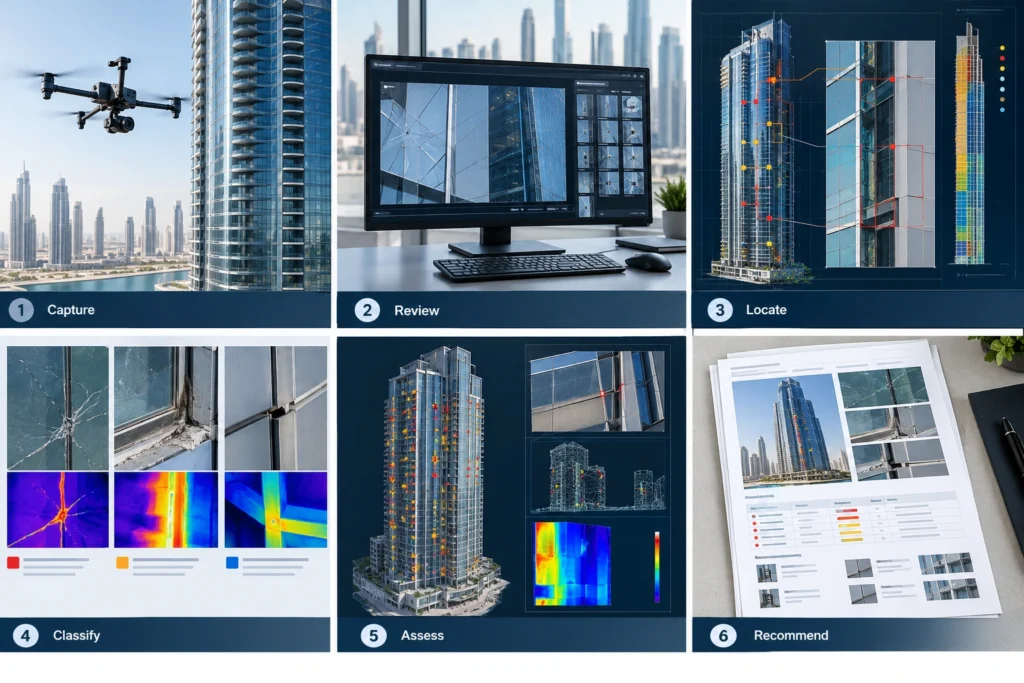
What Is a Facade Inspection Report?
A facade inspection report is a technical document that records the observed condition of a building’s exterior. It explains which areas were inspected, what defects were identified, where they are located and what action may be needed.
For high-rise buildings, reports may use drone photographs, close-up images, thermal data and digital façade maps.
Unlike a general photo collection, a professional facade inspection report links each observation to a specific building component and location.
For example, instead of simply saying that sealants are damaged, it should identify the affected elevation, the approximate level, the evidence and the recommended investigation. This allows maintenance teams to find the issue without repeating the entire inspection.
What Does a Professional Drone Facade Inspection Report Include?
The exact contents depend on the inspection scope. However, a useful building inspection report sample should include the following sections.
1. Building and Inspection Details
The opening section should identify:
- Building name and location
- Inspection date
- Inspection purpose and scope
- Areas and elevations covered
- Inspection method and equipment
- Access limitations
- Inspector or reviewer details
These details establish what was examined and, equally important, what was not.
2. Defect Log and Location References
The defect log is an organised record of identified issues. Each entry should include a unique defect ID, the location, the affected component, the observation and a supporting image.
For instance, a defect could be logged as F-001, east elevation, Level 18. Location references are particularly important in towers where many floors share the same design and glazing arrangement.
3. Annotated Images and Photographic Evidence
An annotated image uses arrows, labels or highlighted areas to identify the observed defect.
A geotagged photo may also contain location information, although GPS coordinates alone may not accurately identify the floor or façade panel on a tall building. Combining overview images with close-up photographs and a façade elevation reference makes the evidence more useful.
4. Severity Ratings and Recommendations
A report should describe how defects are ranked. The severity rating should be based on the inspection criteria and the available evidence. The recommendations should make clear whether monitoring, repairs or an additional evaluation is required.
5. Engineer Review and Sign-Off
Where required by the project scope, the report should identify the responsible engineering reviewer and include appropriate engineer sign-off.
A drone operator’s image record should not be presented as a structural safety certification unless the required professional assessment has actually been completed.
Drone Inspection Report Sample: Step-by-Step Walkthrough
Consider a hypothetical inspection of an apartment building in Dubai. During the inspection, the team notices a possible sealant issue along a glazing joint on the outside of the building. The sample entry below shows how that finding could be documented.
| Report Field | Sample Finding |
|---|---|
| Defect ID | F-001 |
| Location | East elevation, Level 18 |
| Component | Façade sealant joint |
| Observation | Visible separation along part of the joint |
| Evidence | Annotated close-up photograph |
| Severity | Requires technical assessment |
| Recommendation | Arrange closer examination and determine suitable repair work |
Step 1: Identify the Defect
Begin with the defect ID and the description. Here, F-001 refers to the visible separation in the sealant joint.
Step 2: Check the Location
Use the elevation and floor references to find the affected area.
Step 3: Review the Evidence
Compare the overview image with the annotated close-up. Check that the image matches the written observation.
Step 4: Understand the Recommended Action
The image indicates a possible issue, but it does not show the condition of concealed components. A closer inspection may be necessary before deciding on repairs.
This is what makes a useful defect report: the reader can locate the issue, review the evidence and understand the next step.
How to Understand Defect Severity Ratings
Not every façade defect requires the same response. Our guide to common façade defects drones detect shows what the findings behind these ratings often look like.
A professional drone survey defect report may use categories such as:
- Low priority: minor observed deterioration requiring routine monitoring or maintenance.
- Moderate priority: a defect requiring planned technical assessment or corrective work.
- High priority: a finding that needs prompt professional review.
- Critical concern: a suspected immediate safety risk requiring urgent action under the relevant safety procedure.
Severity should be assigned using defined criteria and qualified judgement. A small visible defect may require closer assessment if it affects a critical component.
What Does a Thermal Inspection Report Show?
A thermal inspection report records temperature patterns captured using infrared thermography.
For building façades, thermal imaging façade inspection may help identify areas that warrant investigation for moisture, insulation problems or thermal bridging.
A useful thermal section should include the thermal image, the matching visual photograph, the inspection conditions, the anomaly location and an interpretation.
However, a temperature difference does not automatically prove water ingress. Sun exposure, reflective materials and weather conditions can affect readings. Any suspected defect should be assessed using suitable methods before its cause is confirmed.
How to Check the Quality of a Facade Inspection Report
Before accepting the final facade inspection report, ask yourself:
- Can we locate every reported defect?
- Are the images clear and properly labelled?
- Does each finding have a useful description?
- Are the severity ratings explained?
- Do the recommendations identify practical next steps?
- Are inspection limitations recorded?
- Is the responsible reviewer identified where required?
A long report is not necessarily a good report. Its value depends on whether your team can understand the findings and act on them.
Need a Sample Façade Inspection Report?
Before commissioning an inspection, ask to review a sample report. It shows the expected image quality, defect documentation, reporting format and recommendations.
Turn Inspection Findings Into Better Maintenance Decisions
A quality facade inspection report is more than a record of damaged building elements. It gives you the information needed to judge risk, plan further investigation and organise corrective work.
For Dubai’s tall buildings, clear defect locations, accurate photos, defined severity ratings and professional advice make maintenance planning more efficient.
To learn more about how this data is collected, read our complete guide to drone facade inspection, which covers inspection scheduling, thermal imaging, reporting and defect identification.
Contact Baseera 360 to discuss the inspection requirements for your building and the report deliverables available.